











Table of Contents
How Often Should You Maintain a Robot Lawn Mower?
Robot lawn mower maintenance does not need to take much time. A quick check after mowing, cleaning every 1–2 weeks, and a more thorough inspection every 1–2 months can help keep the mower working properly.

The exact frequency depends on how often the mower runs and your lawn conditions. Wet grass, mud, leaves, and frequent mowing may require more frequent cleaning.
A simple maintenance routine looks like this:
|
Maintenance |
Recommended Frequency |
|
Check for grass and debris |
After mowing / As needed |
|
Clean wheels and underside |
Every 1–2 weeks |
|
Clean sensors and charging contacts |
Every 1–2 weeks |
|
Check blades |
Every 1–2 months |
|
Check battery and charging station |
Monthly |
|
Deep clean and prepare for storage |
Before winter |
Following a regular schedule is usually easier than waiting until the mower develops a problem. The rest of this guide explains what to check and how to maintain each major component.
€749,00
€1.168,00
€849,00
€999,00
Safety First: What to Do Before Maintenance
Before cleaning or inspecting a robot lawn mower, make sure the mower cannot start unexpectedly. This is especially important when working around the blades.
Follow these basic steps:
- Turn off the mower before cleaning or maintenance.
- Remove it from the charging station and disconnect the power supply when required.
- Wear protective gloves when handling the blade disc or blades.
- Never put your hands near the blades while the mower is powered on or able to operate.
For tasks such as blade replacement or cleaning the underside, always follow the safety instructions provided for your specific model. A few seconds spent securing the mower before maintenance can prevent unnecessary injuries.
How to Clean a Robot Lawn Mower
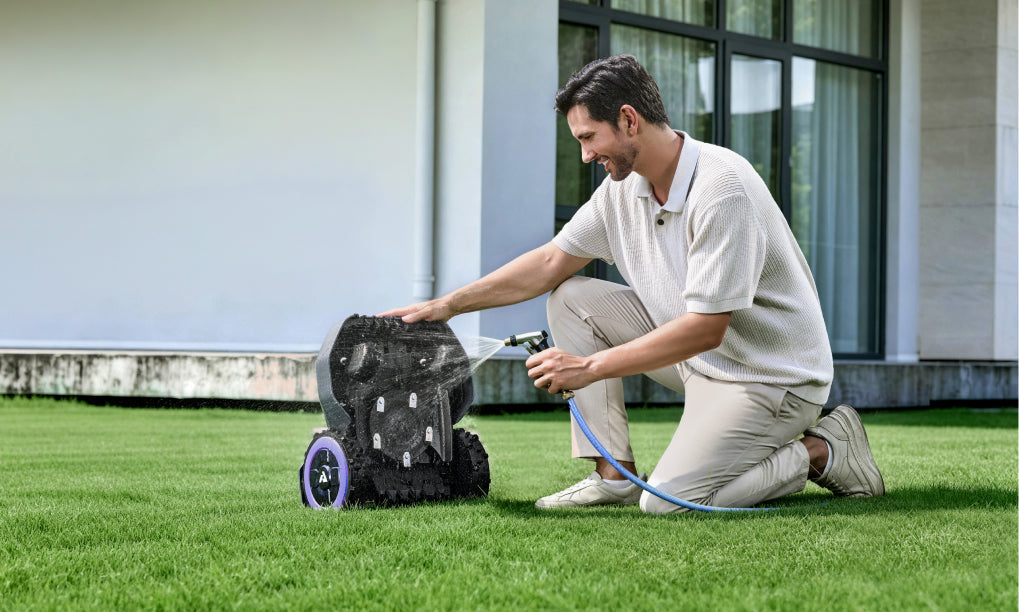
Grass clippings, dirt, and mud can build up around the underside, wheels, blade disc, and sensors, especially when the mower operates frequently or on wet grass. A quick cleaning every 1–2 weeks can help maintain cutting and navigation performance.

What to Clean
- Underside: Remove accumulated grass and mud around the blade disc.
- Blades and blade disc: Clear away grass and debris before checking the blades.
- Wheels: Remove grass, mud, and other material that may affect movement.
- Sensors and cameras: Wipe away dust, grass, and water spots so they can detect obstacles properly.
- Charging contacts: Keep the contacts clean to maintain reliable charging.
Use a soft brush or cloth for routine cleaning. Avoid high-pressure water unless the manufacturer's instructions specifically allow it. Water resistance varies between models, and the charging station may have different cleaning requirements from the mower itself.
If the mower is used in wet or muddy conditions, clean it more frequently rather than waiting for the next scheduled maintenance.
Blade Maintenance: When Should You Replace the Blades?
Robot mower blades gradually become dull with regular use. Worn blades can leave uneven cuts, torn grass tips, or uncut patches, reducing mowing quality.
Check the Blades Regularly
Inspect the blades about every 1–2 months during the mowing season. You should also check them sooner if the mower runs frequently or the lawn contains debris.
Replace the blades if you notice:
- Grass is no longer cut cleanly.
- Grass tips look torn or damaged.
- Cutting performance has noticeably decreased.
- Blades are bent, cracked, or heavily worn.
- The mower makes unusual noises while mowing.
Blade Maintenance: When Should You Replace the Blades?
Robot mower blades gradually become dull with regular use. Worn blades can leave uneven cuts, torn grass tips, or uncut patches, reducing mowing quality.

Check the Blades Regularly
Inspect the blades about every 1–2 months during the mowing season. You should also check them sooner if the mower runs frequently or the lawn contains debris.
Replace the blades if you notice:
- Grass is no longer cut cleanly.
- Grass tips look torn or damaged.
- Cutting performance has noticeably decreased.
- Blades are bent, cracked, or heavily worn.
- The mower makes unusual noises while mowing.
How to Maintain the Charging Station
The charging station needs regular attention because grass, leaves, dirt, and debris can interfere with docking and charging. Check the station about every 1–2 weeks during the mowing season.

Keep the Area Clear
Remove grass clippings, leaves, mud, and other objects around the charging station and its docking path. Make sure the mower has a clear route to return to the station.
Check the Charging Contacts
Inspect the charging contacts on both the mower and station. If they are dirty or oxidized, gently clean them with a dry or slightly damp cloth, following the manufacturer's instructions.
Also check the power cable and connections for visible damage or loose connections.
Protect the Charging Station
Avoid placing or cleaning the charging station in ways that expose its electrical components to unnecessary water. Do not use a high-pressure washer unless the manufacturer specifically permits it.
If the mower repeatedly fails to dock or charge, check the station position, docking path, and charging contacts before assuming there is a problem with the battery.
Robot Mower Battery Care and Storage
The battery is one of the most important components of a robot lawn mower. Proper charging, temperature control, and seasonal storage can help maintain battery performance over time.
How to Care for the Battery
- Keep the charging contacts clean so the mower can charge reliably.
- Avoid extreme temperatures whenever possible, especially during long-term storage.
- Watch for shorter runtime: If the mower covers significantly less area on a full charge than it used to, the battery may be aging.
- Follow the manufacturer's charging instructions rather than using an incompatible charger or power supply.
How to Store a Robot Mower for Winter
If you won't use the mower for several months, prepare it before storage:
- Clean and dry the mower thoroughly.
- Charge the battery according to the manufacturer's storage instructions.
- Turn off the mower.
- Store it in a dry, frost-free location.
- Store the charging equipment according to the manufacturer's instructions.
Don't assume every robot mower uses the same storage procedure. Battery chemistry and recommended storage charge can vary by model, so check the owner's manual before putting the mower away for the season.
Keep the Software and Firmware Updated
Software and firmware updates can improve navigation, app stability, obstacle detection, and overall performance. Keeping the mower updated also ensures you have access to the latest features and bug fixes provided by the manufacturer.
Check for Updates Regularly
Open the mower's companion app and check for available firmware updates every few weeks or whenever the app sends a notification.
Before updating:
- Make sure the mower has sufficient battery.
- Keep it connected to a stable Wi-Fi or network connection if required.
- Follow the manufacturer's update instructions.
- Avoid turning off the mower during an update.
Firmware updates won't replace physical maintenance, but keeping the software current can help prevent navigation issues and unexpected software problems. Always check the release notes when available to see what has changed.

Robot Mower Maintenance Schedule: Weekly, Monthly & Seasonal
A simple maintenance schedule makes it easier to keep your robot mower in good condition without spending too much time on upkeep.
|
Maintenance Task |
How Often |
What to Check |
|
Remove grass and debris |
After mowing / As needed |
Underside, wheels and blade area |
|
Clean mower |
Every 1–2 weeks |
Body, underside and wheels |
|
Clean sensors/cameras |
Every 1–2 weeks |
Dirt, grass and water spots |
|
Check charging station |
Every 1–2 weeks |
Docking area, contacts and cables |
|
Check blades |
Every 1–2 months |
Wear, damage and cutting quality |
|
Check wheels and moving parts |
Monthly |
Rotation, damage and unusual noise |
|
Check firmware |
Every few weeks |
App notifications and updates |
|
Deep clean |
End of mowing season |
Mower and charging equipment |
|
Prepare for winter storage |
Before winter |
Battery, cleaning and storage location |
A Simple Routine
Weekly: Remove debris and clean the areas that collect grass most quickly.
Monthly: Inspect the blades, wheels, sensors, charging contacts, and other visible components.
Seasonally: Perform a deeper cleaning and prepare the mower and battery for long-term storage before winter.

How to Extend the Life of Your Robot Lawn Mower
Regular maintenance can help prevent avoidable wear and keep a robot lawn mower working reliably for longer. You don't need to spend a lot of time on maintenance—a few minutes of regular care is usually better than waiting for a problem to appear.
Focus on these habits:
- Keep it clean: Remove grass, mud, and debris before buildup becomes difficult to remove.
- Replace worn blades: Dull or damaged blades can reduce cutting quality and put more strain on the mower.
- Keep sensors clear: Clean cameras and sensors regularly to maintain reliable navigation and obstacle detection.
- Protect the battery: Follow the recommended charging and winter-storage procedures.
- Check the charging station: Keep the docking area and charging contacts clean.
- Install software updates: Keep firmware current to benefit from performance improvements and bug fixes.
The goal isn't to maintain every component every day. A consistent maintenance routine helps you catch small issues early, reduce unnecessary wear, and avoid more expensive repairs.
FAQ: Robot Lawn Mower Maintenance
How often should you clean a robot lawn mower?
For normal use, clean the mower about every 1–2 weeks and remove heavy grass or mud buildup as needed. Wet or muddy conditions may require more frequent cleaning.
How often should robot mower blades be replaced?
There is no universal replacement interval. Check the blades every 1–2 months and replace them when they become dull, damaged, or when cutting quality noticeably decreases.
Can you wash a robot lawn mower with a hose?
It depends on the model. Some robot mowers are designed to tolerate water, while others have specific cleaning restrictions. Always check the manufacturer's instructions before using a hose, and never use a high-pressure washer unless specifically approved.
How do you clean the underside of a robot mower?
Turn the mower off and follow the manufacturer's safety instructions first. Then use a soft brush or cloth to remove grass, dirt, and mud from the underside and around the blade disc.
How long does a robot mower battery last?
Battery life varies by model, usage, charging cycles, and storage conditions. A noticeable reduction in mowing time after a full charge can indicate that the battery is aging and may eventually need replacement.
Should you store a robot lawn mower indoors during winter?
If the mower will not be used for an extended period, indoor storage in a dry, frost-free location is generally recommended. Follow the manufacturer's instructions for cleaning, charging, and battery storage before putting it away.
What happens if you don't maintain a robot lawn mower?
Grass and debris can accumulate around the wheels, blades, and sensors, potentially reducing cutting quality, navigation, and charging reliability. Regular maintenance helps identify these problems before they become more serious.
Can you leave a robot lawn mower outside all year?
Some models are designed to withstand outdoor conditions, but that does not necessarily mean they should remain outside through winter. Check the model's weather and storage requirements, particularly for freezing temperatures and prolonged periods of non-use.


Leave a comment
This site is protected by hCaptcha and the hCaptcha Privacy Policy and Terms of Service apply.